“PHP Encoder & Obfuscator — Protection for PHP Source Code”
“PHP Encoder & Obfuscator”
for PHP Developers
Thank you very much for purchasing our premium script.
If you have any questions that are beyond the scope of this help file,
please feel free to email us via our user page contact form. Have a good one!
PHP Encoder & Obfuscator — It can be used as Anti-Theft Protection for your PHP Source Code.
Any information contained on this page are for information only.
The information does not represent warranted properties.
✘ ATTENTION —
It should be pointed out that this script maybe does not work correct
on files that make use of the short open tag notation <? better allways use
<?php at the beginning of your PHP!
Installation & Upgrade - top
Requirements
- Apache Web Server 2.0 or above
- PHP 4.2 or above
Installation
- Download the ZIP package from CodeCanyon
- Extrakt ZIP
You should have the following directories:
"/main/bin/"
"/main/config/"
"/main/plugins/"
"/main/repository/"
"/main/resources/"
"/documentation/" (don't upload this dir to your webserver)
- Optional: Setup the Parameters in the "/main/config/default.php" File (use e.g. Notepad++)
- Open FTP and Upload content of "/main/" Folder (not the Folder it self) to your "encoder" directory (create these folder on webspace) or use e.g. XAMPP on your localhost
- Make sure that the "/encoder/repository" directory is writable (CHMOD 755)
- Open URL to "/encoder/" Folder in your Browser
At this point, the installation is complete. Although just by installing the PHP Encoder & Obfuscator offers the possibility to protect PHP source code directly without any other configuration settings, in order to benefit of the full feature set, it is better to create some obfuscation settings that will be used by your applications. Please refer to the Settings section to find out how to configure obfuscation engine.
Upgrade
- Download the ZIP package from CodeCanyon
- Extrakt ZIP
- Open FTP to your "encoder" directory or use e.g. XAMPP on your localhost
- Upload and overwrite all files in "/encoder/bin/" and "/encoder/resources/" folder with new ones downloaded from CodeCanyon
Getting Started Guide - top
In order to benefit of the full feature set of the PHP Encoder & Obfuscator, it is better to create an environments that will be used by your applications. There are two things to be done in order to create an environment:
- create a code repository, to get protection regarding the real location of your PHP files; The code repository will hide the paths to your original PHP files, and so they will be used from the script only. Please refer to The Code Repository to find out how to configure a code repository for your application.
- create a configuration preset, to use setting preset across your application; this gives you the possibility to use the "urlcontroller" parameter instead of the Web-Form to work with your PHP code files. Please refer to The Configuration Preset to find out more about configuration presets.
The Code Repository
The Encoder & Obfuscator will backup the new version of your Form Input to your Code Repository Folder.
The code repository will hide the real path to the submittet PHP files and will increase the protection level. The directorie can be located anywhere on your server and it will not be revealed when using the script. There is no way for the client-side to find out where the actual PHP source code is located, so nobody can execude his own submitted code.
Achieve more protection using Apache .htaccess
Even the directory path of a repository entry remains unknown for the outside world, you can furthermore protect it by using a .htaccess file that will limit the access more drastically. A sample .htaccess is provided inside the "/encoder/repository/" directory (named "_htaccess.txt") and its contents should look like:
  <Files ~ "\.php$">
  Order allow,deny
  Deny from all
  </Files>
or
  <Files *.php>
  deny from all
  </Files>
If you whant to protect your Directory just rename the file from "_htaccess.txt" to ".htaccess" and it should work!
The Configuration Preset
A configuration preset represents a set of settings grouped together as default values under a single name if you do not use the submit-form but the urlcontroller to work with a PHP source from your respository.
So, instead of:
http://localhost/encoder/?file=test
You can use:
http://localhost/encoder/?file=test&cfg=my-configuration
How to create a configuration preset
Open the "/encoder/config/default.php" File (e.g. use Notepad++ Editor) and edit the vars as explaned and
save the file named e.g. my-configuration.php under the "/encoder/config" directory and make it look like this:
<?PHP
/* ---------------------------------------------------------------------------------------------------- */
// DEFAULT-CONFIG
/* ---------------------------------------------------------------------------------------------------- */
$DEMO = TRUE;
$DEBUG = ''; // 'YES' or leave empty for NO! - NEVER set this to 'YES' on your live webserver!
$CDN = TRUE; // TRUE = Use CDN for Bootstap & jQuery / FALSE = load local saved files
$REPOSITORY = 'repository/'.crc32($_SERVER['SERVER_NAME']).'/'; // ATTENTION: put slash / at the end!
$COPYRIGHT = array(
'Copyright © '.date('Y').' - All rights reserved.',
'Do not change this code, or your script will not work.',
'Reverse engineering of this file is strictly prohibited.',
'File protected by copyright law and provided under license.',
'All Rights Reserved. This file may not be redistributed in whole or significant part.',
'I spent a lot of time developing this so i\'m kindly asking you to respect my work. Thank you very much!');
$CLEANUP = 1; // IF > 0 THEN DELETE REPOSITORY "o." FILES OLDER THAN n MINUTES!
$dontDecoyCode = FALSE; // FALSE = Default
$expirationDays = 30; // Default Date (Today + $expirationDays) if you use 'Lock Date' Function
$lockErrorAlert = TRUE; // TRUE = enable user errors / FALSE = disable user errors
$hashErrorAlert = 'Code manipulation detected'; // Message on Hash Error
$dateErrorAlert = 'Software license expired'; // Message on expired script
$domainErrorAlert = 'Code not allowed on this domain'; // Message on invalid host
// Remove # at appropriate line for uncomment
#$_POST['dontMinify'] = 'on'; // OR '' for NO
#$_POST['doLockDate'] = 'on'; // HINT: IF SET USE doLockDate & lockDate
#$_POST['lockDate'] = date('d.m.Y',time()+86400*$expirationDays); // OR '16.11.2016'
#$_POST['doLockDomain'] = 'on'; // HINT: IF SET USE doLockDomain & lockDomain
#$_POST['lockDomain'] = '('.$_SERVER['SERVER_NAME'].'|localhost)'; // OR $_SERVER['SERVER_NAME']
#$_POST['dontScrambleVars'] = 'on'; // OR '' for NO
#$_POST['checksumType'] = 'md5'; // 'whirlpool' OR 'sha1' OR 'md5' OR 'crc32'
$_POST['encryption'] = 'on'; // OR '' for NO encryprion
// PLUGINS
#$_POST['plugin']['a_obfuscator'] = 'Variables & Functions'; // OR SET TO "Variables" OR "Functions"
// BETA "Strings" OR "Variables & Strings" OR "Functions & Strings" OR "Variables, Functions & Strings"
#$_POST['plugin']['c_encoder'] = 'Use Dynamic Encoder Algorithm'; // OR SET TO ''
#$_POST['plugin']['e_looper'] = '12'; // OR SET TO '', 'number' OR 'Random' for number from 1 to 128
Edit the file and tune the configuration settings according to your needs.
To start the script with those configuration preset settings, use the following URL:
http://localhost/encoder/?file=test&cfg=my-configuration
Each settings is quite self-explanatory but please refer to Protection Techniques and Features to find out more about each setting included in the configuration preset.
✘ HINT
When specifying the configuration preset name inside the script tag, you must skip the .php extension.
The preset file must reside inside the "/encoder/config" directory.
For your convenience, a few configuration presets exists already and they are ready to be used: default, minify, decent, hard, paranoid.
They should be enough for a large usage scenarios and you can just use them directly, or you can copy-rename-modify and use them as templates to create your own presets - just make sure the given pattern is followed.
Example:
http://localhost/encoder/?file=test&cfg=minify
The example above will use the "/encoder/config/minify.php" configuration preset and will do only minification on the "test.php" as all the other settings are tuned off (without encryption, no variable scrambling etc.).
If no configuration preset is specified when processing PHP files, the default one is used by default. So, this:
http://localhost/encoder/?file=test
is equivalent with this:
http://localhost/encoder/?file=test&cfg=default
Protection Techniques - top
Encode & Obfuscation Techniques and Features
This PHP Encoder & Obfuscator is a PHP protector that allows you to obfuscate, scramble, minimize, domain lock, set an expiration date and encrypt your PHP source code in order to avoid changes and theft.
This section will explain the features of this software product and it will show you how to achieve maximum protection level for your PHP files or applications.
✘ ATTENTION
With enough time and effort, this encryption can be undone !
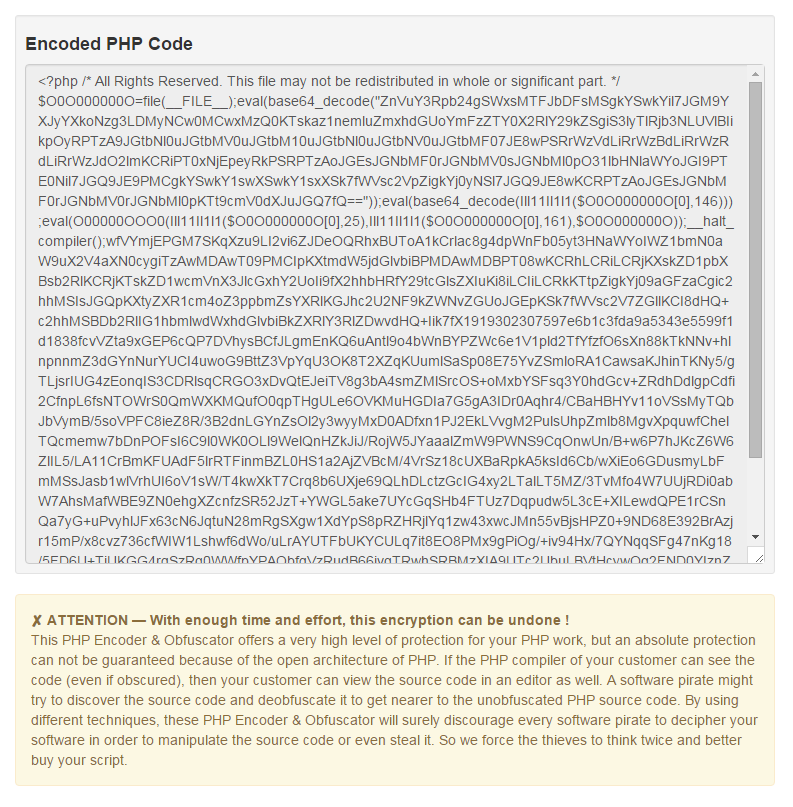
This PHP Encoder & Obfuscator offers a very high level of protection for your PHP work, but an absolute protection can not be guaranteed because of the open architecture of PHP. If the PHP compiler of your customer can see the code (even if obscured), then your customer can view the source code in an editor as well. A software pirate might try to discover the source code and deobfuscate it to get nearer to the unobfuscated PHP source code. By using different techniques, these PHP Encoder & Obfuscator will surely discourage every software pirate to decipher your software in order to manipulate the source code or even steal it. So we force the thieves to think twice and better buy your script.
Most of the samples below are meant to be used inside a configuration preset file. Please refer to The Configuration Preset to find out more about configuration presets.
Default Settings Access Type
Supposing we use the script directly on PHP files like this:
http://localhost/encoder/?file=filename&urlcontroller=true
The PHP Encoder & Obfuscator will of course, deliver the obfuscated version of "filename.php" and save it in the repository named "o.filename.php".
The PHP Encoder use automaticaly code repository access to hide the real path to PHP files and increase the protection level. Basically, the code repository consists of directory containing the PHP files to be protected. The directory can be located anywhere on your server and they will not be revealed when using the script.
Dynamic Bytecode Encryption (Encrypt)
Using bytecode encryption, the code will be transformed into a byte string that will be decrypted by the PHP Code itself through an also encrypted boot function.
The dynamic bytecode encryption feature will deliver a different encrypted byte string content on each request making decryption attempts very difficult.
✘ HINT — Encryption enlarges payload size
The higher encryption level, the higher protection is achieved and the larger processed obfuscated code will result. Using high levels of encryption can cancel the minify effect feature by enlarging the size of the PHP code affecting the script performance also.
You should use the default settings in order to achieve a decent balance of protection level and payload size. To enable encryption, put this in your configuration preset file:
  $_POST['encryption'] = 'on'; // Default
or
  $_POST['encryption'] = ''; // No Encryption
Current Internet Domain Lock (Fix Domain) only if "Encrypt" is checked
A thief might say: "It is encodet and obfuscated? So what? I don't need to understand it, I just want to use it. I will get it and copy it to my web site." To stop this way of stealing, you have to make your script to work only on special domain. The domain lock feature will limit the PHP code functionality to the selected domain only, so the script will stop working if copied to another internet domain. Of course, you can provide this kind of protection by yourself inside the PHP source code; but what if you have more domains? You will have to maintain multiple files having exactly the same functionality for each internet domain you hold - this can become very unhandy. So just put this in your configuration preset:
  $_POST['doLockDomain'] = 'on';
and
  $_POST['lockDomain']   = '('.$_SERVER['SERVER_NAME'].'|localhost)';
or
  $_POST['lockDomain']   = $_SERVER['SERVER_NAME'];
or
  $_POST['lockDomain']   = '(example.com|second.example.com|third.example.com)';
or
  $_POST['lockDomain']   = 'example.com';
Expiration Date Setup (Set Expiration Date) only if "Encrypt" is checked
Specifying an Expiration Date will apply a time limit to the functionality of the PHP code. When the given date is reached, the script will stop working. You can use this feature to enable a subscription type licenses on your PHP applications. Just put this in your configuration preset file (modify the date according to your needs):
  $expirationDays      = 30;   // Default Date (Today + $expirationDays)
  $_POST['doLockDate'] = 'on'; // HINT: SET doLockDate & lockDate
  $_POST['lockDate']   = date('d.m.Y',time()+86400*$expirationDays);
Select Checksum Algorithmus (Checksum Type) only if "Encrypt" is checked
To protect the encrypted code being altered, we use a checksum. Whenever the hash is not correspond directly to the string the script will stop.
Whirlpool Algorithmus on Wikipedia —
Sha1 Algorithmus on Wikipedia—
Md5 Algorithmus on Wikipedia—
Crc32 Algorithmus on Wikipedia
So just put this in your configuration preset:
  $_POST['checksumType']   = 'whirlpool';
or
  $_POST['checksumType']   = 'sha1';
or
  $_POST['checksumType']   = 'md5';
or
  $_POST['checksumType']   = 'crc32';
Names Replacement (Do not obfuscate names) only if "Encrypt" is checked
If you apply the names replacement technique over your original code, all the declared variable names will be replaced with self generated ones consisting only of: 'I', 'l', '1' making the code very hard to understand and modify. So it will hopefully take hours of hard work a thief manages to decrypt the encrypted code and reach to more readable PHP source code. Just put this in your configuration preset if your don't want to scambel the variable names:
$_POST['dontScrambleVars'] = 'on';
Size Optimization (Do not minify source code)
The size optimization feature will minify the code by removing comments, carriage returns, line feeds, tabs and white spaces from the original PHP source code, making smaller download sizes and also contributing to obfuscation. Just put this in your configuration preset if your don't want to minify the code:
$_POST['dontMinify'] = 'on';
✘ HINT
PHP compiler on webservers needs valid PHP code to run, and the encrypted code is of course valid PHP also.
This is the reason that the encryption is made using a public key and a PHP boot loader function in order the be able to self-decrypt when the server runs the encrypted code. There is no other way to make the encryption safer. If the server manages to decrypt the encrypted code, also an ambitious thief can try this by using its own intelligence or some specialized tools. There is no script out there on the market that can 100% guarantee that its encryption cannot be broken. Yes, it can be broken, because the decryption algorithm is there, embedded in the PHP boot loader function.
Decoy Code Generation only if "Encrypt" is checked
Enabling Decoy Code Generation will protect the resulted PHP code files more against scrapping. On unencoding attempts to the served PHP code, the generated decoy source code whants to ensure that the possible thief will work in vain if he will try to deobfuscate the code. By default this is used in your configuration preset file if you don't whant to generate decoy code:
$dontDecoyCode = TRUE;
User Messages only if "Encrypt" is checked
When setting expiration time limit and/or locking the internet domain, the script can generate code that will alert the user when the time limit has been reached and the script has expired or when it detects running attempt on other internet domains.
Although this can be a fair behaviour, it is not advisable to enable this kind of messages because in this way you give to the potential attacker a clue on what's happening and why its stolen script does not work anymore.
To enable user messages, put this in your configuration preset:
  $lockErrorAlert   = TRUE; // default

To disable user messages, put this in your configuration preset:

  $lockErrorAlert = FALSE;

You might also want to check message properties in order to modify the actual messages:

  $hashErrorAlert   = 'Code manipulation detected';      // Message on Hash Error
  $dateErrorAlert   = 'Software license expired';        // Message on expired script
  $domainErrorAlert = 'Code not allowed on this domain'; // Message on invalid host
Using the Script - top
Using the PHP Encoder & Obfuscator
As you probably know, PHP Encoder & Obfuscator is a PHP protector that allows you to obfuscate, scramble, minimize, domain lock, set an expiration date and encrypt your PHP source code in order to avoid theft. This section will show some usage scenarios to provide you fast accommodation with this engine.
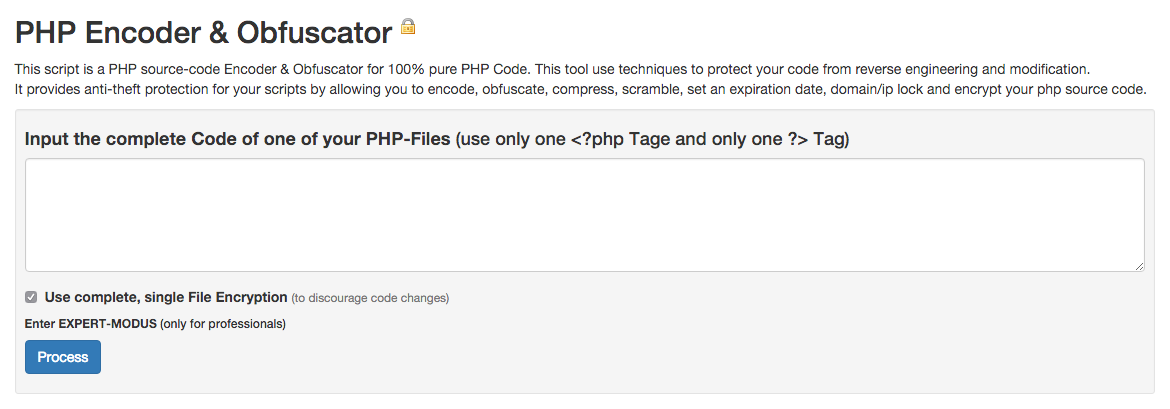
1. Working with PHP files by submitting the code and select the settings in the form
Take a look at our online Demo!
2. Working with PHP files located in the repository and using configuration presets by query parameters
If you want to process your Script by URL-Controller-Interface use the following syntax:
http://localhost/encoder/main/?file=filename&urlcontroller=true
Prozessed file will be shown on screen and saved in repository named:
o.filename.php
If you want to work with other config presets than default, use following syntax:
http://localhost/encoder/main/?file=filename&cfg=your-config-name&urlcontroller=true
Advanced Usage - top
Advanced Parameters in the "/encoder/config/default.php" config file:
| Name |
Default |
Description |
| $DEMO |
FALSE |
If set to TRUE, only the file demo.php in the Repository can be used! |
| $DEBUG |
'' |
If not set to '' (empty string), the script will print debug-infos on screen! NEVER use this on your live webserver! |
| $CDN |
TRUE |
If set to FALSE, Bootstap & jQuery will be loaded from local file instead of fast load CDN (Content Delivery Network)! |
| $REPOSITORY |
'repository/'.crc32($_SERVER['SERVER_NAME']).'/' |
The location where your handled code and by web-form submited code will be stored!
(ATTENTION: put slash / at the end!) |
| $COPYRIGHT |
array('powered by adilbo', 'all rights reserved', 'reverse engineering forbidden') |
Randomly select one comment for the processed code! |
| $CLEANUP |
0 |
If set greater than 0 then delete repository "o._…_.php" files older than n minutes! |
Plugins - top
Available at extra charge on codecanyon
Obfuscator
How hard should the result be encrypted; Variable names are lost forever!
But what if somehow after many, many hours of hard work a thief manages
to decrypt the encrypted code and reach to more readable PHP source code
that might look similar to your original source code?
"Similar" is the keyword here because if you apply the names replacement
obfuscation technique over your original PHP code, all the declared
variable names will be obfuscated and replaced with self generated ones
consisting only of scrambled characters making the code very hard to
understand and modify.
It's a bullet proof protection and will not increase the load size!
You have the following Options:
- Variables — Variable Names are scrambled
- Functions — Functions Names are scrambled
- Variables & Functions — …
- Strings (beta) — All Strings in Double-Quotes are obfuscated (This is still a beta feature!)
- Variables & Strings — (beta)
- Functions & Strings — (beta)
- Variables, Functions & Strings — (beta)

Advanced Parameters in the "/encoder/config/default.php" config file:
| Name |
Default |
Description |
| $_POST['plugin']['a_obfuscator'] |
Variables & Functions |
or set to "Variables", "Functions", "Strings", "Variables & Strings", "Functions & Strings", "Variables, Functions & Strings". But please note, that "string" could break your code since "string" is still a beta feature. |
Dynamic Encoder
Use Dynamic Encoder Algorithm;
Use to encode single File or encode only single function!
It's no bullet proof protection and will increase the load size!
You have the following Options:
- No Encoding
- Use Dynamic Encoder Algorithm

Advanced Parameters in the "/encoder/config/default.php" config file:
| Name |
Default |
Description |
| $_POST['plugin']['c_encoder'] |
Use Dynamic Encoder Algorithm |
Or set to "" if you don't want to use this feature. |
Looper
How many times should the result be encrypted;
It's no bullet proof protection and will increase the load size!
You have the following Options:
- No Loop
- 1 x — If you buy it you should also use it!
- 7 x — Better safe than sorry!
- 12 x — That should be enough in most cases!
- 32 x — Hint: Maybe you are a little bit paranoid? ;-)
- 64 x — Attention: You could run in performance problems!
- 128 x — Danger; You could run in memory and performance problems!
- Random — Repeat loop by random from 1 to 128 times!

Advanced Parameters in the "/encoder/config/default.php" config file:
| Name |
Default |
Description |
| $_POST['plugin']['e_looper'] |
12 |
Set to number between 1 and 128 (no larger number) or "Random". Leave empty if you don't want to use this feature. |
Does it work with Codeigniter?
Yes, it work with following certain way of operating:
- Copy original file to repository folder. i.e., pages.php
- Manually enter the url in browser: http://localhost/encoder/?file=pages
- Go to repository folder and grap o.pages.php file
- Copy the file (not the code) to desired location and rename to pages.php there
Thanks for the Hint to Yahya
Why the size of the processed script is larger even if the minifying feature is on?
Because the bytecode encryption feature was also active.
Encryption enlarges payload size.
The higher encryption level, the higher protection is achieved and
the larger processed code will result.
Using high levels of encryption can cancel the minify effect
feature by enlarging the size of the resulted PHP code.
Why the processed script runs slower?
Because the bytecode encryption feature was active.
Using encryption can bring some performance loss
because the processed code needs to be decrypted before run.
Does this also process HTML or JavaScript or other programming languages?
No.
The script was designed to process just PHP code.
Are nginx, IIS servers supported?
Probably yes.
Although the script have not been tested on other servers,
it should work fine if PHP requirements are fulfilled.
The PHP code of PHP Encoder & Obfuscator is encodet or obfuscated in anyway?
No.
When purchasing you will get the full code, full documentation and samples.
Why my PHP code is no longer working after the process?
It is of course possible the script have a bug.
In order to track it down, please turn off all the options.
If the processed code is not working with all the options off
(yes, it is not really encodet with all the options off,
but it is still served through the script),
it means that there is a problem with your PHP code.
After turning off all the settings, turn them back on one-by-one so that
only one should be active at a time. This will test individually each
protection feature to see if there is a problem with it.
After each turning on please check if the processed code stops working.
If this is the case, please inform us about it and we will investigate further.
Which are the supported browsers?
All of them.
It is a server-side solution and it is independent of the browser used.
I buy an extended license, can I use it in a product that will be sold on codecanyon?
Licensing terms are imposed by envato.
For more information please visit:
http://codecanyon.net/licenses or please ask envato directly.
Is there a possibility to test the obfuscator software
with a demo version with limited features or time?
No.
But, you are free to play as long as you want with the online demo and
also we will more than happy to answer you to any pre-sale questions.
What are the Obfuscation Pitfalls
It is possible that issues may arise when using obfuscation in your encoding settings. The most common symptoms of these sorts of issues are changes in code behaviour or code just crashing from references to undefined variables or functions. The basic idea of obfuscation is that it changes the names of things such as function names, variable names and class names to make reading the code much more difficult. While potential hackers can still figure out what these renamed things are and what they do, obfuscation complicates things. However, there are instances, most notably when code still attempts to reference the original variable names, where issues can arise when encoding. The causes and solutions can vary and depend on how your PHP code is written or what framework you are using.
This page is enhanced by your questions — to be continued…
Sources and Credits - top
Our Script uses the following external assets:
Once again, thank you so much for purchasing this premium script. As stated at the beginning, we'd be glad to help you if you have any questions relating to this script. We'll do our best to assist. If you have a more general question related to plugins on CodeCanyon, you might consider visiting the forums and asking your question in the "Item Discussion" section.